<?xml version="1.0" encoding="utf-8"?><feed xmlns="http://www.w3.org/2005/Atom" xml:lang="en-us"><generator uri="https://gohugo.io/" version="0.156.0">Hugo</generator><title type="html">Blockchain on Marcin Jasion - Pragmatic DevOps</title><link href="https://2a300508.mjasion.pages.dev/tags/blockchain/" rel="alternate" type="text/html" title="html"/><link href="https://2a300508.mjasion.pages.dev/tags/blockchain/index.xml" rel="alternate" type="application/rss+xml" title="rss"/><updated>2022-04-09T10:00:00+00:00</updated><id>https://2a300508.mjasion.pages.dev/tags/blockchain/</id><entry><title type="html">Deploy your first blockchain contract to Ethereum</title><link href="https://2a300508.mjasion.pages.dev/posts/development/first-blockchain-contract/?utm_source=atom_feed" rel="alternate" type="text/html"/><id>https://2a300508.mjasion.pages.dev/posts/development/first-blockchain-contract/</id><author><name>Marcin Jasion</name></author><published>2022-04-09T10:00:00+00:00</published><updated>2022-04-09T10:00:00+00:00</updated><content type="html"><![CDATA[<blockquote>Step by step guide to deploy first contract on Ethereum blockchain</blockquote><h2 id="first-contract---pet-owners">First contract - Pet owners</h2>
<p>I am learning blockchain and smart contracts. This post will be my note on how I am starting my journey into blockchain technology.</p>
<p>In this example I will create a contract for storing who is owning a Pet.</p>
<h2 id="development">Development</h2>
<div class="highlight"><pre tabindex="0" style="color:#f8f8f2;background-color:#272822;-moz-tab-size:4;-o-tab-size:4;tab-size:4;-webkit-text-size-adjust:none;"><code class="language-solidity" data-lang="solidity"><span style="display:flex;"><span><span style="color:#75715e">// SPDX-License-Identifier: MIT
</span></span></span><span style="display:flex;"><span><span style="color:#66d9ef">pragma solidity</span> <span style="color:#f92672">^</span><span style="color:#ae81ff">0</span>.<span style="color:#ae81ff">8</span>.<span style="color:#ae81ff">0</span>; <span style="color:#75715e">//build contract on top of Solidity &gt;=0.8.0 and &lt;0.9.0
</span></span></span><span style="display:flex;"><span>
</span></span><span style="display:flex;"><span><span style="color:#66d9ef">contract</span> <span style="color:#a6e22e">PetOwner</span> {
</span></span><span style="display:flex;"><span>    <span style="color:#66d9ef">mapping</span> (<span style="color:#66d9ef">string</span> <span style="color:#f92672">=&gt;</span> Pet) <span style="color:#66d9ef">public</span> petOwners;
</span></span><span style="display:flex;"><span>
</span></span><span style="display:flex;"><span>    <span style="color:#66d9ef">struct</span> <span style="color:#a6e22e">Pet</span> {
</span></span><span style="display:flex;"><span>        <span style="color:#66d9ef">string</span> name;
</span></span><span style="display:flex;"><span>        <span style="color:#66d9ef">string</span> petType;
</span></span><span style="display:flex;"><span>    }
</span></span><span style="display:flex;"><span>
</span></span><span style="display:flex;"><span>    <span style="color:#66d9ef">function</span> <span style="color:#a6e22e">addPetOwner</span>(<span style="color:#66d9ef">string</span> <span style="color:#66d9ef">memory</span> ownerName, <span style="color:#66d9ef">string</span> <span style="color:#66d9ef">memory</span> _name, <span style="color:#66d9ef">string</span> <span style="color:#66d9ef">memory</span> _petType) <span style="color:#66d9ef">public</span> {
</span></span><span style="display:flex;"><span>        petOwners[ownerName] <span style="color:#f92672">=</span> Pet({name<span style="color:#f92672">:</span> _name, petType<span style="color:#f92672">:</span> _petType});
</span></span><span style="display:flex;"><span>    }
</span></span><span style="display:flex;"><span>
</span></span><span style="display:flex;"><span>}
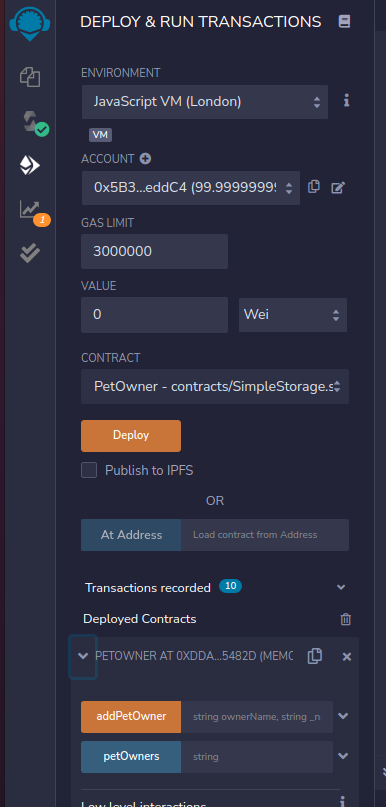
</span></span></code></pre></div><p>Put it in the Remix IDE: <a href="https://remix.ethereum.org/" target="_blank" rel="noopener">https://remix.ethereum.org/</a>. It should compile and we can deploy it on the local environment:</p>
<p><img src="/posts/development/first-blockchain-contract/deploy_smart_contract.png" alt="Deploy contract"></p>
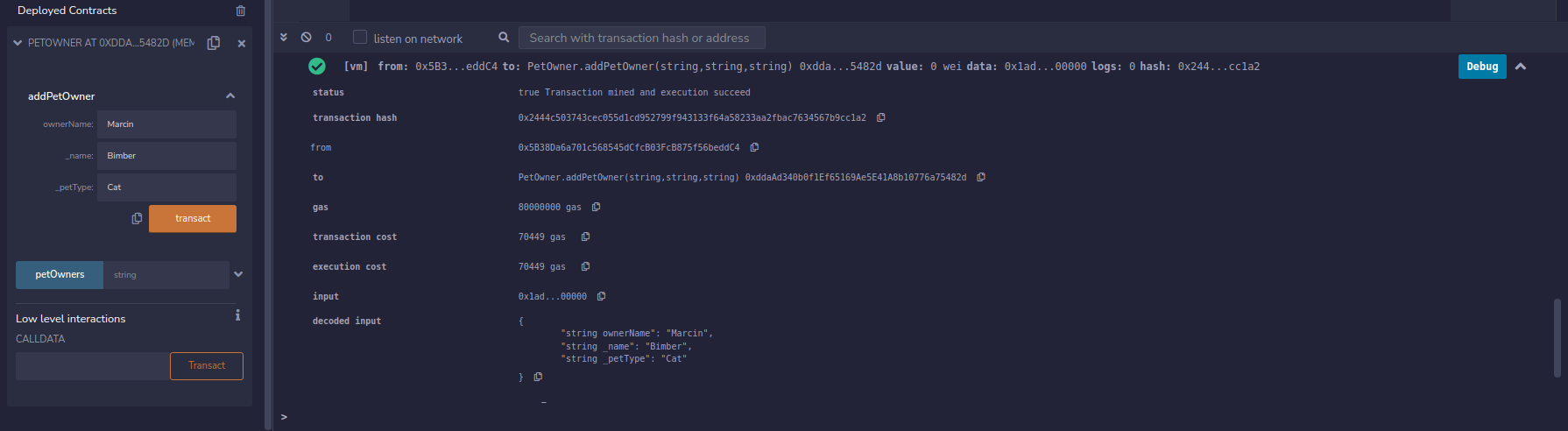
<p>When we have contract deployed we can create example contract ownership</p>
<p><img src="/posts/development/first-blockchain-contract/create_test_transaction.png" alt="Test Transaction"></p>
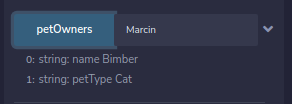
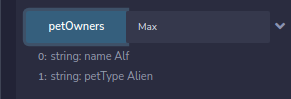
<p>and ask <code>petOwners</code> field for information which Pet is owned by <code>Marcin</code>.</p>
<p><img src="/posts/development/first-blockchain-contract/check_test_transaction.png" alt="Test check"></p>
<h2 id="lets-deploy-it-to-ethereum-test-network">Let&rsquo;s deploy it to Ethereum test network</h2>
<p>Ethereum allows testing our contract on test networks. For this example I will use Rinkeby. This is a free network for testing smart contracts.</p>
<blockquote>
<p>I am not covering how to install Metamask. Always remember to not share <strong>private key</strong> and <strong>seed</strong>
You can always create a new Metamask identity for your tests.</p>
</blockquote>
<ol>
<li>Switch the Remix Environment from <code>Javascript VM</code> to <code>Injected Web3</code></li>
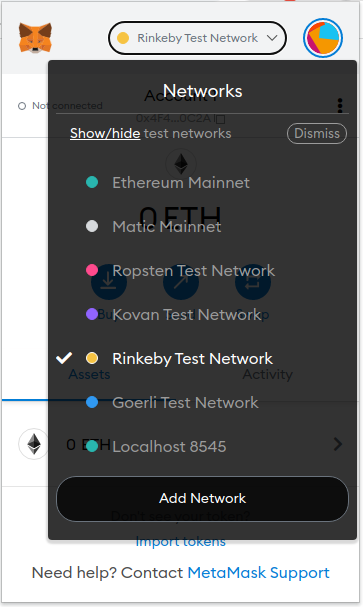
<li>Connect your Metamask. Ensure you have chosen Rinkeby network
<img src="/posts/development/first-blockchain-contract/metamask_rinkeby.png" alt="Metamask Rinkeby Network"></li>
<li>If you don&rsquo;t have any <code>ETH</code> coins you can use this Faucet to grab some: <a href="https://faucets.chain.link/rinkeby" target="_blank" rel="noopener">https://faucets.chain.link/rinkeby</a></li>
<li>Click deploy. You will be asked by Metamask to confirm the transaction: <a href="https://rinkeby.etherscan.io/tx/0x60ad0e4b25ba4dadef1410d766222b30815fe9e6bc7168cd6cd0f205bb4d90e3" target="_blank" rel="noopener">Contract deployment transaction</a></li>
</ol>
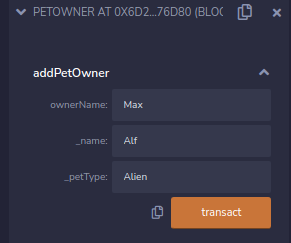
<p>Now I can test my contract. I fill the data
<img src="/posts/development/first-blockchain-contract/rinkeby-example-data.png" alt=""></p>
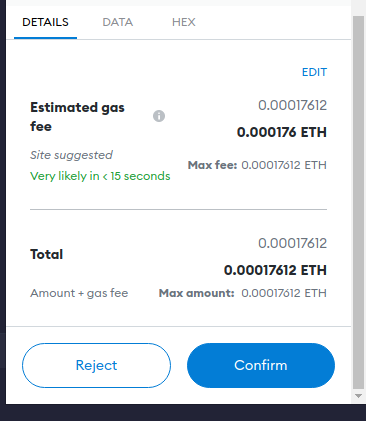
<p>And we will be asked again for confirming the transaction
<img src="/posts/development/first-blockchain-contract/metamask-example-contract.png" alt="">.</p>
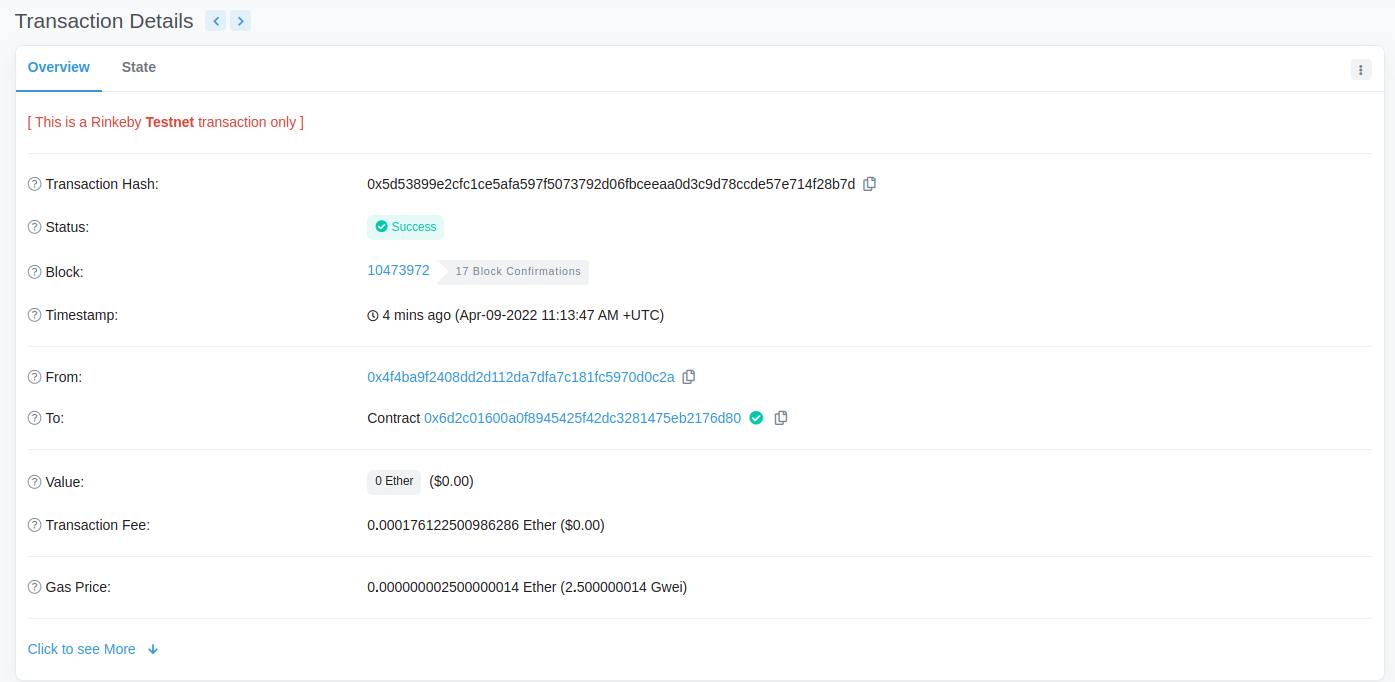
<p>When everything will be done, our transaction should be visible on <a href="https://rinkeby.etherscan.io/tx/0x5d53899e2cfc1ce5afa597f5073792d06fbceeaa0d3c9d78ccde57e714f28b7d" target="_blank" rel="noopener">Etherscan</a>
<img src="/posts/development/first-blockchain-contract/etherscan.png" alt="Etherscan"></p>
<p>And at the end we can check if <code>petOwner</code> field contains our definition:
<img src="/posts/development/first-blockchain-contract/rinkeby-data-confirmation.png" alt=""></p>
<hr>
<p><em>This post contains my notes from a Blockchain development tutorial available <a href="https://www.youtube.com/watch?v=M576WGiDBdQ" target="_blank" rel="noopener">here</a>.</em></p>
]]></content><category scheme="https://2a300508.mjasion.pages.dev/tags/ethereum" term="ethereum" label="ethereum"/><category scheme="https://2a300508.mjasion.pages.dev/tags/blockchain" term="blockchain" label="blockchain"/><category scheme="https://2a300508.mjasion.pages.dev/tags/solidity" term="solidity" label="solidity"/><category scheme="https://2a300508.mjasion.pages.dev/tags/tutorial" term="tutorial" label="tutorial"/></entry></feed>